
Boxplotdraw
Contents
Boxplotdraw#
Met behulp van de functie boxplotdata uit de vorige opdracht ga je nu de boxplot tekenen.
Vul je eigen functies in#
Voeg de functies die je voor boxplotdata ontwikkeld hebt toe aan de code in de Elm-codecel verderop, onder -- insert your code here.
Uitleg#
De view leest de gegevens uit de invoer en plaatst deze in model.content.
Via stringToFloats worden deze omgezet in een List Float, die aangeboden wordt aan boxplotdata.
Het resultaat komt in de lijst a.
Deze gegevens worden uit a gehaald en in de volgende Floats gezet:
kl, kleinstekw1, eerste kwartielkw2, tweede kwartielkw3, derde kwartielgr, grootste
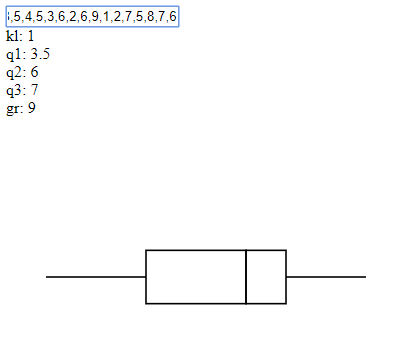
Deze getallen worden gebruikt om binnen een svg viewbox de volgende polylines (lijnen opgebouwd uit meerdere punten) aan te maken:
line1box1box2line2
Zie https://www.w3schools.com/graphics/svg_polyline.asp als je meer over svg en polyline wilt weten.
Resultaat#
Run het elm programma in de cell hier onder. Je ziet het volgende:
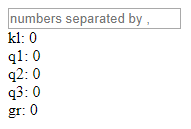
In het vakje kun je de waardes voor een boxplot invullen. Vul daar de volgende waardes in uit het voorbeeld van Dr. Aart:
7,3,8,6,8,5,4,5,3,6,2,6,9,1,2,7,5,8,7,6 (Let op: zet geen spaties na de komma’s).
Als je de juiste boxplot-functies ingevuld hebt zie je deze boxplot:
import Html exposing (Html, text, div, input, Attribute)
import Browser exposing (sandbox)
import Html.Events exposing (on, keyCode, onInput)
import Html.Attributes exposing(..)
import String exposing(split)
import List exposing(..)
import Maybe exposing(..)
import Svg exposing (..)
import Svg.Attributes exposing (..)

stringToFloats str =
  let
    lst = String.split "," str
  in
    List.map (\s -> Maybe.withDefault 0 (String.toFloat s)) lst

pointsListToString: List Float -> String
pointsListToString list =
  case list of
    [] -> ""
    [x] -> ""
    x::y::xs -> (String.fromFloat x) ++ "," ++ (String.fromFloat y) ++ " " ++
                    (pointsListToString (drop 2 list))

main = Browser.sandbox { init = init, update = update, view = view }

type alias Model = { content : String }

init : Model
init = { content = "" }


view : Model -> Html Msg
view model =
     let
       a = boxplotdata (stringToFloats model.content)
       kl = withDefault 0 (head (drop 0 a))
       kw1 = withDefault 0 (head (drop 1 a))
       kw2 = withDefault 0 (head (drop 2 a))
       kw3 = withDefault 0 (head (drop 3 a))
       gr = withDefault 0 (head (drop 4 a))
       s = 200/(gr-kl)
       h = 15
       line1 = pointsListToString [kl*s, 100,
                                   kw1*s, 100]
       box1 = pointsListToString [kw1*s, 100-h,
                                  kw2*s, 100-h,
                                  kw2*s, 100+h,
                                  kw1*s, 100+h,
                                  kw1*s, 100-h]
       box2 = pointsListToString [kw2*s, 100-h,
                                  kw3*s, 100-h,
                                  kw3*s, 100+h,
                                  kw2*s, 100+h,
                                  kw2*s, 100-h]
       line2 = pointsListToString [kw3*s, 100,
                                   gr*s , 100]
     in
      div []
       [ input [placeholder "numbers separated by ,", value model.content, onInput Change] []
        , div [] [ Html.text ("kl: " ++ String.fromFloat kl) ]
        , div [] [ Html.text ("q1: " ++ String.fromFloat kw1) ]
        , div [] [ Html.text ("q2: " ++ String.fromFloat kw2) ]
        , div [] [ Html.text ("q3: " ++ String.fromFloat kw3) ]
        , div [] [ Html.text ("gr: " ++ String.fromFloat gr) ]
        , svg [ viewBox "0 0 500 400", Svg.Attributes.width "800px" ]
         [
           polyline [ fill "none", stroke "black", points line1 ] [],
           polyline [ fill "none", stroke "black", points box1 ] [],
           polyline [ fill "none", stroke "black", points box2 ] [],
           polyline [ fill "none", stroke "black", points line2 ] []
         ]
       ]

type Msg
  = Change String

update : Msg -> Model -> Model
update msg model =
  case msg of
    Change newContent ->
        { model | content = newContent }


-- insert your code here

first : List Float -> Float
first lst = 0

last : List Float -> Float
last lst = 0

median : List Float -> Float
median lst = 0

q1 : List Float -> Float
q1 lst = 0

q3 : List Float -> Float
q3 lst = 0

boxplotdata : List Float -> List Float
boxplotdata lst =
  let
    sortlst = sort lst
  in
    [first sortlst, q1 sortlst, median sortlst, q3 sortlst, last sortlst]


-- compile-code